
How to Turn a Selfie Into a Halloween Costume With AI
A practical walkthrough for the AI Halloween costume generator: photo choice, prompt structure, identity preservation, retries and publishing checks.
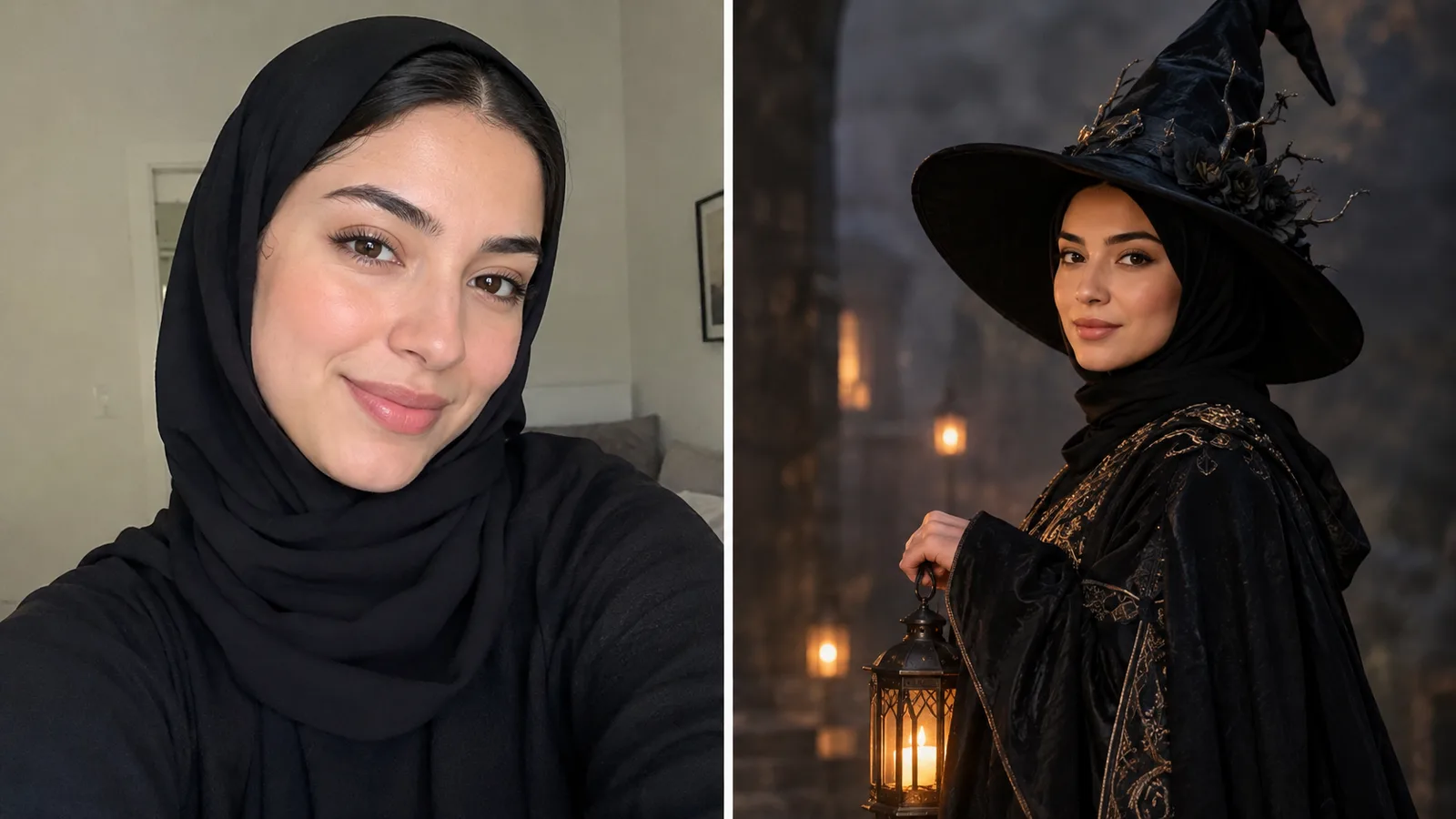
Most Halloween costume photos fail for a boring reason: the photo does not look like the person. The costume is fine, the background is fine, but the face has drifted into a generic AI portrait. The fix is not a longer prompt. The fix is a better workflow: one clear source photo, a prompt that separates identity from costume, and a retry rule that changes one variable at a time.
This guide walks through that workflow inside Animate AI's hosted image workspace. It uses the same six presets that ship on the AI Halloween costume generator page. Browsing the presets and prompts is free. Generation uses purchased credits, and the workspace shows the cost before you run a job.
Why a selfie is enough
A modern image-edit model does not need a costume photo. It needs a reliable face reference, a clear instruction, and a scene description. A normal selfie gives the model the first two. The costume comes from the prompt.
The catch is that the model has to decide what to keep. If you only say “make me a vampire,” it may keep the face, change the lighting, invent a costume, and move the person to a new room. Some of those changes are welcome. Some are not. A useful prompt tells the model which parts are locked and which parts are open.
In our presets, the first sentence is always an identity lock. The costume comes second. The scene and light come third. The exclusions come last. That order is deliberate: the model reads the prompt as a sequence of priorities, and the first sentence carries the most weight.
Choose the source photo first
Use a photo with these traits:
- Front-facing, with the full head and shoulders visible.
- Even light, ideally from a window or a soft lamp.
- No heavy beauty filter, no extreme wide-angle lens.
- One person, unless you are using the couple workflow.
- A background that is simple enough to replace.
Avoid photos where the face is partly covered, the person is looking away, or the image is very compressed. A sharp 1,000-pixel photo is usually enough. A blurry 4,000-pixel photo is not.
If you only have a group photo, crop one person into a separate image before uploading. The model handles one clear reference better than a crowd.
The four-part costume prompt
Here is the structure we use for every costume preset:
- Identity lock. “Use the uploaded photo as the primary reference. Preserve the subject's recognizable facial identity, facial proportions, skin tone, approximate age and natural anatomy.”
- Costume. Garment, hair, accessories, silhouette, fabric.
- Scene and light. Location, time of day, practical lights, weather, color palette.
- Exclusions. Extra limbs, duplicated fingers, distorted anatomy, text, logos, watermarks.
The order matters, but the wording matters more. “Preserve the face” is weaker than “preserve the subject's recognizable facial identity, facial proportions and skin tone.” The second version gives the model specific attributes to protect.
Put the prompt to work
Prompt lab
6 tested directions
Pick a preset, edit the prompt, then copy it or open the workspace with the prompt already loaded.
739 characters · La generazione usa crediti acquistati
The prompt lab above is editable. Pick a preset, change the costume color or the background, then copy the prompt or open the workspace with the prompt already loaded. The workspace uses the selected image model; GPT Image 2 and the Nano Banana edit models are the usual starting points for identity-preserving edits.
A worked example: Midnight Braids
The Midnight Braids preset is a good first test because it has a clear silhouette and a simple light story. The prompt asks for long violet braids, a modest black-and-purple velvet gown, a moonlit Victorian garden, soft fog, glowing lanterns and cinematic soft lighting.
If the first result changes the face, do not rewrite the whole prompt. Shorten the garden description and repeat the identity lock. If the outfit looks flat, add fabric words: velvet, lace, metallic trim. If the background looks like a painted backdrop, add depth cues: foreground leaves, a distant fountain, shallow depth of field.
One variable per retry is the rule. If you change the hair, the dress, the background and the lighting at the same time, you cannot tell which change helped.
What the model is actually good at
Image-edit models are strong at:
- Changing garment color, fabric and silhouette.
- Adding accessories and makeup.
- Replacing a simple background with a new scene.
- Matching a color palette across the image.
- Keeping a face recognizable when the source is clear.
They are weaker at:
- Exact jewelry and small text.
- Hands with complex poses.
- Perfect hair edges against busy backgrounds.
- Reproducing a specific licensed character.
- Guaranteeing a perfect identity match on every run.
That is why the presets avoid tiny text, complex hand poses and trademarked characters. They aim for a clear, publishable portrait, not a forensic reconstruction.
Retry rules that save credits
Every generation costs credits. A disciplined retry saves more money than a clever prompt.
- Face drift: shorten the scene, repeat the identity lock, reduce the number of changes.
- Wrong costume: change only the garment sentence. Keep the scene and light unchanged.
- Flat light: add one practical light source and a direction. “Warm lantern light from camera left” is easier to follow than “make it cinematic.”
- Plastic skin: ask for natural skin texture, visible pores and realistic shadows. Avoid “beauty retouch.”
- Extra fingers: change the pose description to a simple hands-hidden or hands-down pose.
- Muddy background: reduce the number of background objects. One clear location beats five details.
If a result is 80 percent right, keep it and fix the remaining 20 percent in a second edit. Regenerating from scratch is usually more expensive than a targeted edit.
Publishing checks before you post
AI images are probabilistic, so review the final file at full resolution:
- Does the face still look like the person?
- Are the hands and jewelry plausible?
- Is there any text, logo or watermark in the background?
- Does the costume respect the platform's content rules?
- Do you have permission to use the person's photo?
- If the image is for a paid ad, does the platform require a synthetic-media disclosure?
The acceptable use policy and content moderation policy apply to every upload. Do not use someone else's face to create misleading or harmful content.
When to move from image to video
If the portrait works, you can animate it. A five-second clip with a slow head turn, drifting fog and a gentle push-in is usually more convincing than a complex action scene. The AI Halloween video generator page includes six motion presets written for still-image animation.
The video workspace uses purchased credits as well. A five-second 720p fast clip starts at about 50 credits; the workspace shows the estimate before you submit. Start short, check the face, then extend only if the motion is stable.
Frequently asked questions
What photo works best for an AI costume edit?
A front-facing photo with even light, no heavy filter and a clear view of the face. One person per photo is easiest to control.
How do I keep my face recognizable?
Keep the identity sentence at the start and end of the prompt, use an image-edit model, and change only one scene variable per retry.
Is the generator free?
Browsing presets and prompts is free. Generation uses purchased credits, and the workspace shows the credit cost before you submit.
Can I use the result commercially?
Commercial use depends on the plan and the model provider's terms. Review the Terms of Service before using an output in an ad, product page or paid campaign.
Why does the costume look different from the preset image?
The preset image is a reference, not a guarantee. The model interprets the prompt for your source photo. Change one prompt variable at a time until the result matches the direction you want.
The bottom line
A good AI Halloween costume is not a slot-machine pull. It is a controlled edit: a clear source photo, a prompt that locks identity first, a scene that explains the light, and a retry rule that protects your credits. Start with one preset, change one variable, and publish only after a full-resolution review.
Open the AI Halloween costume generator when you are ready to try it. If you want a broader set of directions first, browse the AI Halloween costumes gallery.
Was this guide useful?
Generatore di costumi di Halloween con IA
Carica un selfie nitido, scegli una direzione per il costume e genera un ritratto di Halloween mantenendo il volto riconoscibile.
Leggi la guida